Harmonybeam 1.3 is here. It is the largest expansion of Harmonybeam’s rhythm and performance features so far, adding a complete rhythm pattern editor, expressive gestures for individual chords, and a resizable external window.
Harmonybeam began as a faster way to write and explore chord progressions inside Ableton Live. Version 1.3 extends that idea beyond choosing chords and voicings: you can now design how the voices of a chord move through a rhythm, how each chord is attacked, and how those details evolve over repeated hits.
The pattern editor and chord gestures are separate systems, but they are designed to work together. A pattern determines when the bass, inner voices, and top note play. A gesture determines how the notes within a chord arrive—as a strum, an arpeggio, a shaped attack, or a custom note order. Combining them can turn a simple progression into a detailed, playable sequence without leaving Harmonybeam or rebuilding the result in the piano roll.
Below is a closer look at the major additions. The complete list of changes is available in the Harmonybeam changelog.
A full editor for rhythm presets
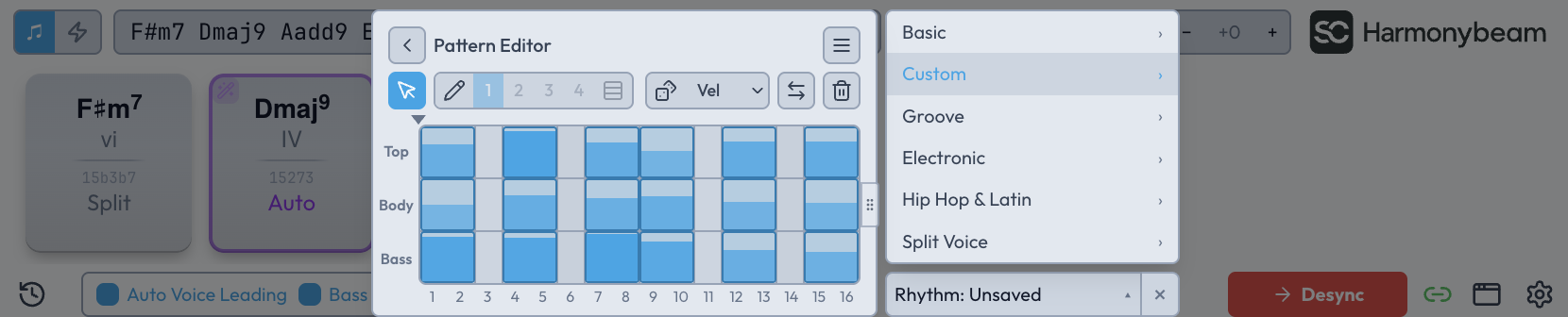
Harmonybeam 1.3 turns the Rhythm menu into a proper pattern-building environment. You can create a pattern from an empty grid, edit any factory preset, and save the result as your own reusable preset.
The Pattern Editor uses three lanes:
- Bass controls the lowest note of the chord.
- Body controls the inner chord tones.
- Top controls the highest note.
Hits can be placed on one lane or across several lanes at once. This makes it possible to move beyond simple repeated chords: the bass can establish one pulse while the upper voices answer it, inner notes can fill the gaps, or all three parts can reunite for an accent. It is the same principle behind the Split Voice factory patterns, now opened up for your own patterns.
Each pattern can be between one and sixteen sixteenth-note steps long. Hits can be moved, resized, copied, duplicated, or deleted with the familiar editing shortcuts. Every hit also has its own velocity, so accents can be drawn directly into the pattern rather than added later in Live.
Two editing modes support different ways of working. The cursor is useful for selecting, moving, resizing, and editing individual hits or groups. The pencil is faster for painting a pattern across the grid. It can draw at intervals of one to four steps, link the three lanes, and erase while Shift is held.
The editor also includes tools for quickly producing variations. You can reverse a pattern, clear it, or randomize its hit placement and velocities. Randomization can keep all lanes together or treat each lane independently, and the velocity range and rhythmic resolution remain under your control. The goal is not to replace deliberate editing, but to provide useful starting points that can immediately be shaped by hand.
Factory presets remain unchanged. Editing one creates an unsaved custom version, which can then be stored under a new name. Saved patterns appear in the Custom group alongside the factory categories, making them available across future sessions.
Read the complete Pattern Editor manual for details about every tool and shortcut.
Per-chord gestures: strums, plucks, and custom arpeggios
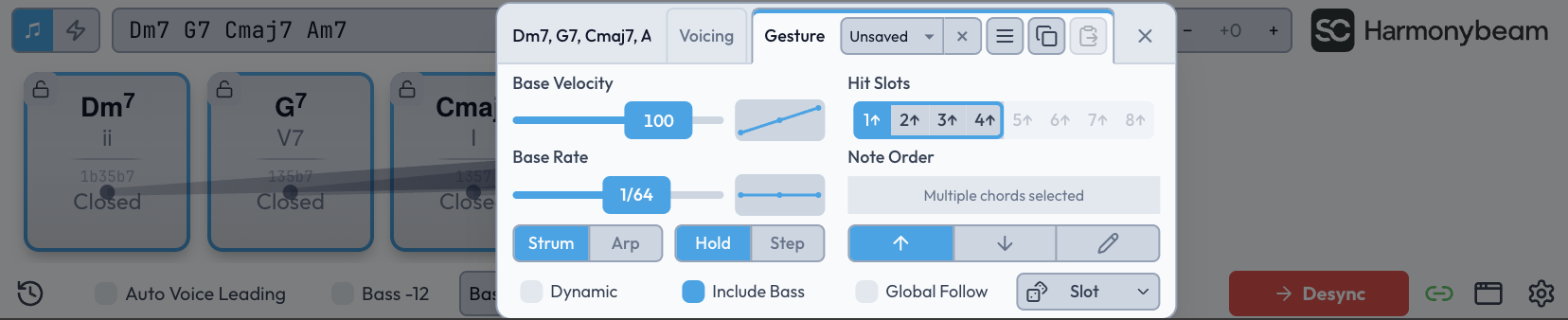
Rhythm patterns define the larger grid. Chord gestures work at the level of each individual chord attack.
A gesture can spread the notes of a chord into an organic strum, build an arpeggio with a custom note order, alternate upward and downward attacks, or cycle through several variations as the chord repeats. Gestures are attached to chord blocks, so different chords in the same progression can behave differently.
The basic timing can operate in two modes:
- Strum distributes the full chord attack across a chosen total duration.
- Arp uses the selected rate as the distance between consecutive notes.
Notes can either sustain for the rest of the rhythm hit or stop when the next attack group begins. The bass can participate in the ordered gesture or remain anchored to the first attack. Velocity and timing curves can create crescendos, decrescendos, swells, accelerations, and decelerations inside the gesture itself.
Gestures also support up to eight Hit Slots. These slots cycle in round-robin fashion when a chord is triggered repeatedly. One hit might travel upward through the chord, the next downward, and another can use a completely custom order. This is useful for guitar-like alternating strums, less mechanical plucks, and arpeggios that change direction over time.
You can apply a gesture to one chord or several selected chords at once. Gesture settings can be copied and pasted, saved as presets, randomized, and switched through MIDI keyswitches. A new Gesture Values display option can show the active gesture directly in the lower part of each chord block.
The Chord Gestures manual covers note ordering, curves, round robin, presets, and MIDI control in more detail.
Patterns and gestures together
The most interesting results come from combining the two systems.
A three-lane rhythm pattern might play the bass on the downbeat, the body on the offbeat, and the top note as a syncopated accent. A gesture can then spread or reorder the notes whenever one of those chord parts is triggered. The rhythm stays readable at the pattern level, while each chord gains its own internal movement.
That combination can produce evolving strummed parts, interlocking bass and upper-voice patterns, round-robin plucks, or elaborate arpeggios from a normal chord progression. Because the result remains connected to Harmonybeam’s chord blocks, voicings, voice leading, and clip sync, harmonic changes do not require the rhythmic detail to be rebuilt from scratch.
A resizable external window
Harmonybeam can now be opened in an external floating window. The window can be freely scaled instead of being limited to the device area at the bottom of Ableton Live.
It can also be extended horizontally. Rather than simply making the interface larger, the additional width lengthens the visible chord strip, so more chord blocks can remain on screen at once. This is particularly useful for longer progressions, detailed rhythm editing, or sessions where Harmonybeam is the main compositional workspace.
The Return to Dock control moves Harmonybeam back into its normal Ableton Live device view when you are finished.
Swing and other workflow additions
Version 1.3 also adds a collection of smaller controls that make the new rhythm and gesture features fit naturally into the existing workflow:
- Swing 8/16 adds global eighth- or sixteenth-note swing to the active pattern, with a slider for the amount.
- Bass Split behavior can now either move bass notes out of the main clip or duplicate them into the bass clip.
- MIDI Triggers Use Rhythm lets chords played from MIDI trigger notes follow the active rhythm instead of sounding as simple held blocks.
- Gesture Values can replace note names or intervals in the lower section of chord blocks.
- Gesture Keyswitch Octave chooses the MIDI octave used to select gesture Hit Slots.
- Chord Label Priority determines whether chord symbols or Roman numerals receive visual priority throughout the interface.
- Default Velocity sets the starting velocity for chord blocks wherever it has not been overridden.
- Phase now moves in sixteenth-note steps, allowing finer offsets of an existing rhythm pattern.
Turning rhythm off is now handled by the X on the Rhythm dropdown. This replaces the older use of the Hold preset as an off state and makes the difference between “no rhythm” and a sustained rhythmic behavior clearer.
Performance, scaling, and reliability improvements
Harmonybeam 1.3 reduces background work involved in clip synchronization and clip ownership management. Clip writing has also been improved for very long clips.
The update fixes several remaining scaling issues at non-standard resolutions and Ableton Live zoom levels on macOS and Windows. It also addresses chord-strip hover detection, shortcut focus, tooltip behavior, overlapping MIDI triggers that could leave notes stuck, Circle of Fifths spelling during generation, and accidental display in the MIDI Configuration dialog.
Two clip-management edge cases have been corrected as well: a synced device created by duplicating a track will no longer write to the original device’s clip, and deleting the track containing a bass clip now correctly releases its Bass Split binding.
Harmonybeam 1.3 and the planned VST version
A VST instrument version of Harmonybeam is planned for late fall 2026. Once it is available, both existing and new customers are planned to receive a license covering the Max for Live and VST versions.
The price of Harmonybeam is planned to increase from $24 to $29 with the VST release. Until then, Harmonybeam remains available at the current $24 price.
Get Harmonybeam 1.3
Harmonybeam 1.3 is available now. Existing customers can download the update from the customer portal.
If you are new to Harmonybeam, visit the Harmonybeam product page to see how it supports chord progression writing, voice leading, rhythm, and MIDI clip workflows inside Ableton Live.
Write the progression, shape the rhythm, and give every chord its own movement inside Ableton Live.
Explore Harmonybeam